0 comments

FIM 2010 R2 Beta / ECMA 2.0 Beta

Published on Friday, July 29, 2011 in

For those interested in trying out the new features of FIM 2010 R2  or jump in with the new extensible MA framework (ECMA) Wednesday the download links were added on the FIM 2010 R2 CEP Connect site. CEP stands for Community Evaluation Program so if you got feedback or find bugs definitely report on that!

The link: https://connect.microsoft.com/site433/fimcep

High-light of the new features:

  • Reporting
  • Web-based Self-Service Password Reset
  • Improved performance for the initial load of the FIM database
  • Scale and load performance improvements
  • Outlook® 2010 support for the FIM add-ins and extensions
  • SharePoint® 2010 support
  • Improved troubleshooting support

1 comments

Microsoft Business Ready Security Trial Environment

Published on Wednesday, July 27, 2011 in

In the past year I’ve been looking for a downloadable Microsoft Virtual Lab demonstrating the Forefront suite. Never found anything. Seems my google/bing skills were a bit off: Microsoft Business Ready Security Trial Environment (4.0g) has been available since 1/13/2011

This page offers several scenario-based lab guides and several VM’s. Technologies covered:

  • Forefront Identity Manager
  • Forefront Unified Access Gateway
  • Forefront Threat Management Gateway
  • Forefront Protection Server Management Console
  • Forefront Protection 2010 for Exchange
  • Forefront Protection 2010 for SharePoint
  • Active Directory Rights Management Service
  • Active Directory Federation Services
  • Direct Access

By posting this I’m pretty sure I’ll be able to find it again whenever I got some spare time to play with this Smile

0 comments

FIM 2010: SSPR Client Error After Updating To Build 4.0.3576.2

Published on Tuesday, July 12, 2011 in

After updating our FIM Servers to the latest build, we also started upgrading the Password Reset Client software on the clients. After some tests we seemed to receive the following error in certain cases:

clip_image002

In words:

A service proxy exception was encountered while running the Password Reset application. Error Text: An unexpected error has occurred. Please contact helpdesk or your administrator. Error Code 40007.

In the trace log:

Microsoft.ResourceManagement: Microsoft.ResourceManagement.WebServices.Client.UnwillingToPerformException: The endpoint could not dispatch the request. ---> Microsoft.ResourceManagement.WebServices.Faults.ServiceFaultException: The endpoint could not dispatch the request.

We quickly saw that we only had this error when users logged on to a workstation where the user didn’t exist in the Portal. IF these people visit the Portal they should get the generic FIM Service unavailable error. However before updating to the last build, the Password Reset Client software just closed quietly when it couldn’t match a user. As it should. I discussed this with someone at Microsoft and it seems to be a known bug which is fixed in FIM 2010 R2 but which will not be fixed in 2010.

Luckily for us all our users are managed from within FIM, except in test where some managed to slip by the FIM processing...

6 comments

Awarded MVP for Identity Lifecycle Manager!

Published on Saturday, July 2, 2011 in ,

Wow! I had no idea it was the time of the year MVP’s were being (re)awarded. Somewhere in the past year I heard I was nominated for MVP and to support my candidature I filled in some docs but the mail I received yesterday came as a complete surprise.

Dear Thomas Vuylsteke,

Congratulations! We are pleased to present you with the 2011 Microsoft® MVP Award! This award is given to exceptional technical community leaders who actively share their high quality, real world expertise with others. We appreciate your outstanding contributions in Identity Lifecycle Manager technical communities during the past year.

The Microsoft MVP Award provides us the unique opportunity to celebrate and honor your significant contributions and say "Thank you for your technical leadership."

Toby Richards
General Manager
Community & Online Support

Special thanks to Markus for coaching and supporting me on the FIM TechNet Forum & Wiki. Thanks to Glenn Zuckerman & Anthony Ho for helping me out every once and while.

Thanks to the people of MCS Belgium for giving me opportunity to get to know FIM and be part of a great project/team. Thanks to my company RealDolmen for providing me with interesting projects again and again.

Thanks to everyone in the FIM community for all the knowledge sharing and troubleshooting help.

And of course, most of all thanks to my wife Stefanie for just letting me do what I do.

Let’s keep up the good work for another year!

MVPLogo

4 comments

FIM 2010: Warm Up Your Portal (IIS)

Published on Monday, June 20, 2011 in ,

One of the typical things of a webapp deployed on IIS is that everyday the first visitor has a very slow loading page. This is due to the application pool recycling. Every night, somewhere between 2 and 4 (for default installs) the application pools are recycled. After this when the first visitor arrives certain code is loaded again which takes some time. Consequent visitors don’t suffer this phenomena.

In the IIS world there’s a known solution for this: "IIS Warm Up scripts”. There even was  a built-in module for this in IIS 7.5, however it was in beta state and currently has been removed from the web. With some PowerShell and Scheduled Task magic we can warm up IIS just as good. In my example the first user was experiencing a 15-20 seconds delay before the FIM Portal showed up. After applying the following solution that was more like 2 seconds.

Our script which will warm up the site will do this every time the application pool is recycled. The trigger for the scheduled task will be an event in the Application event log. Therefor we have to modify the default settings of the application pool so that it logs these events.

Open the IIS management console and locate the application pool responsible for the SharePoint site hosting your FIM portal

image

Righ-click and choose advanced settings, make sure to set “Specific Time” to True.

image

Every time the application pool is recycled by the schedule defined in the “Specific Times” array the following even will be logged:

image

A worker process with process id of '4420' serving application pool 'SharePoint - 80' has requested a recycle because it reached its scheduled recycle time.

Now the following script can be executed to warm up IIS. It will do this by visiting the page and performing a get. It’s very basic and probably can be improved or rewritten.

function get-webpageWithAuthN([string]$url,[System.Net.NetworkCredential]$cred=$null){
    write-host -foregroundcolor green "Warming up $url";
    $wc = new-object net.webclient;
    $wc.credentials = $cred;
    #$wc.Headers.Add("user-agent", "PowerShell");
    $html = $wc.DownloadString($url);
    #$html
}


#FIM
$website =
http://FIM.setspn.blogspot.com/IdentityManagement
$credentials = [System.Net.CredentialCache]::DefaultCredentials;
get-webpageWithAuthN -url $website -cred $credentials

Now we can create the Scheduled Task. I choose to run it as “local system”. This seems enough to warm up the portal. I think because this way the FIM Service is queried to see if “Local System” (my FIM server itself) is known in the portal. Obviously this is not the case and I will probably see a “Service not available” error. But the point is that the Portal is warmed up!

image

We will add some triggers:

  • Type: On an event
  • Log: System
  • Source: WAS
  • Resource ID: 5076

image

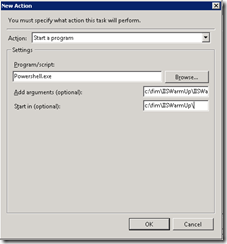
Then we will specify an action:

  • Action: Start a program
  • Program/Script: PowerShell.exe
  • Add arguments: c:\yourfolder\script.ps1
  • Start in: c:\yourfolder

image

If we also want to trigger the script when we an administrator recycles an Application Pool we have to add a trigger for event 5079 (System –> WAS: 5079)

image

If we also want to trigger the script when we perform an IISreset we can add a trigger for the following event 3201 (System > IIS-IISREeset: 3201)

image

image

Obviously this way of working could be applied for other websites too.

3 comments

Forefront TMG Array In Workgroup Managed By EMS: Firewall Ports

Published on Monday, June 13, 2011 in

Lately I helped a colleague setting up a TMG array. The TMG nodes were in a workgroup in the DMZ. In the LAN there was a domain-joined EMS server. As there was a firewall between DMZ-LAN we had to open up some ports. The TMG documentation is pretty good, but I couldn’t find any documentation regarding the firewall ports…

So here is a table I built by setting up a DC, EMS, TMG and a m0n0wall virtual firewall appliance in my personal lab. I like m0n0wall as it comes with an easy web interface. It also has logging which you can activate on a per rule base. Here are some screenshots:

Firewall rules:

image

Logging:

image


And finally the result of all my hard work:


From

To

TCP/UDP

Port

Remark

EMS

TMG

TCP

135

RPC endpoint mapper

EMS

TMG

TCP

10000-65535

RPC

EMS

TMG

TCP

445

Remote diagnostic logging

EMS

TMG

TCP

3847

MS Firewall Control

TMG

EMS

TCP

2171

MS Firewall Storage

TMG

EMS

TCP

2172

MS Firewall Secure Storage

TMG

EMS

TCP

3847

MS Firewall Control

TMG

EMS

TCP

135

RPC endpoint mapper

TMG

EMS

TCP

49152-65535

RPC

Some remarks:

  • RPC from TMG –> EMS doesn’t seems necessary. I was able to open the MMC on both the EMS and the TMG node.
  • RPC from EMS –> TMG starts off at port 10.000. All though windows 2008 (&R2) officially start off at 49152, there are some server products which modify this. Think TMG, Think Exchange. (The default dynamic port range for TCP/IP has changed in Windows Vista and in Windows Server 2008)
  • EMS –> TMG port 445 was necessary for remote diagnostic logging. I’m still looking into as why I can’t view the logging remotely. I can enable/disable it though…

0 comments

FIM Config Migration: Tips For A Successful Migration

Published on in

Performing a configuration migration is pretty straight forward. You just have to pay attention to some things. Besides the excellent guide (Configuration Migration Deployment Guide ) I also pay attention to the following points:

1. FIM MA health

This is a rather nasty one. However if you fail to detect it, and you happen to migrate your configuration to a FIM MA in this situation you’ll be doomed to a do a rollback using SQL backup-restore. The good news it’s easy to detect. Every time you perform modifications to your MA’s or MV configuration, this info get’s replicated to the FIM Service. You can see this info below administration > all resources:

image

Every time such an update occurs, requests are logged in the FIM requests log:

image

That’s also one of the reason why running a Full Synchronization profile on your FIM MA very often is a bad idea. This data gets replicated to the FIM Service every time you do a full sync on your FIM MA. This is the easiest way to make your FIM Service DB explode in size. But, back on track now. Using the following WMI trickery (discovered by Craig Martin): MSDN: MIIS_ManagementAgent Class

You can force this replication to occur by executing the following statements:

### Get the FIM MA
$fimMa = Get-WmiObject -Class MIIS_ManagementAgent -Namespace root/MicrosoftIdentityIntegrationServer -Filter ("Type='Forefront Identity Management (FIM)'")
### Call the WMI method to ReSync the Config Objects from miiserver.exe to microsoft.resourcemanagement.service.exe$fimMa.ResyncSyncConfigObjects()
$fimMa.ResyncSyncConfigObjects()

Now what should the outcome look like?

image

The ReturnValue Success is a good start. You also should see the requests being logged. However, if you see the following entry in your application log you got some work to do:

image

In words:

A update on the configuration of a MA or MV failed to replicate to a target connector directory that is capable  of storing MA/MV configurations.  As a result, the MA/MV configuration data in this connector directory is not up to date.  Please correct the condition that causes the error, and triggers a resync by updating the password information of the target MA.
Additional information:
Error Code: 0x80230709
Error Message: (The extension operation aborted due to an internal error in FIM Synchronization Service.)
Operation: Clean up MAs
Name of the MA to replicate: 
Guid of the MA to replicate: 
Name of the target MA: FIM MA
Guid of the target MA: {35F6A1E2-CCF6-4C8A-91FF-2114625B144D}

I haven’t found a nice workaround just yet… What I’ve done successfully in the past:

  1. delete the FIM MA (CS and MA itself)
  2. wipe the MV
  3. Reconfigure the FIM MA from scratch or by importing an earlier (healthy?) FIM MA xml.
  4. Import, join and sync in the proper order

This might seem like a lot of pain, and it sure it. But I prefer avoiding even worse: having a setup which refuses to recognize it’s declarative SR’s.

2. MA Schema Up-to-dateness

Very short tip: before you start exporting/importing, make sure your schema’s of your MA’s are up to date. Doing an update schema on each MA is a quick & easy test. This way you can avoid some additional trickery. It shouldn’t break anything, but it might give you all sorts of weird issues.

3. Attribute Precedence

Make sure to double check your attribute precedence. If you have declarative rules and classic rules (which the FIM MA always does), you might have to toy around with the attribute precedence. As this might get scrambled due to the order the MV gets the contribution info.